public interface Collector<T, A, R> {
    Supplier<A> supplier();
    BiConsumer<A, T> accumulator();
    Function<A, R> finisher();
    BinaryOperator<A> combiner();
    Set<Characteristics> characteristics();
}
T: the generic type of the items in the stream to be collected
A: the type of the accumulator - the object on which the partial result will be accumulated during the process
R: the type of the object resulting from the collect operation.
For instance, we could implement a ToListCollector<T> which will gather all elements of a Stream<T> into a List<T>
public class ToListCollector<T> implements Collector<T, List<T>, List<T>>;
Understanding the Methods Declared by Collector Interface
The SupplierMethod
This returns a Supplierof an empty accumulator - which is a function without any parameter that creates an instance of an empty accumulator used during the collection process.
For instance, a
The AccumulatorMethod
This returns a function that performs the reduction operation and adds an element to a resulting container.
For ToListCollector<T>, this function will add the current item to the list containing the previous elements.
public BiConsumer<List<T>, T> accumulator() {
    return (list, item) -> list.add(item);
    // or just return List::add;
}
The FinisherMethod
This returns a function that is invoked at the end of the accumulation process.
For ToListCollector<T>, the accumulator object already coincides with the final expected result, so an identity function is used.
public Function<List<T>, List<T>> finisher() {
    return Function.identity();
}
The CombinerMethod
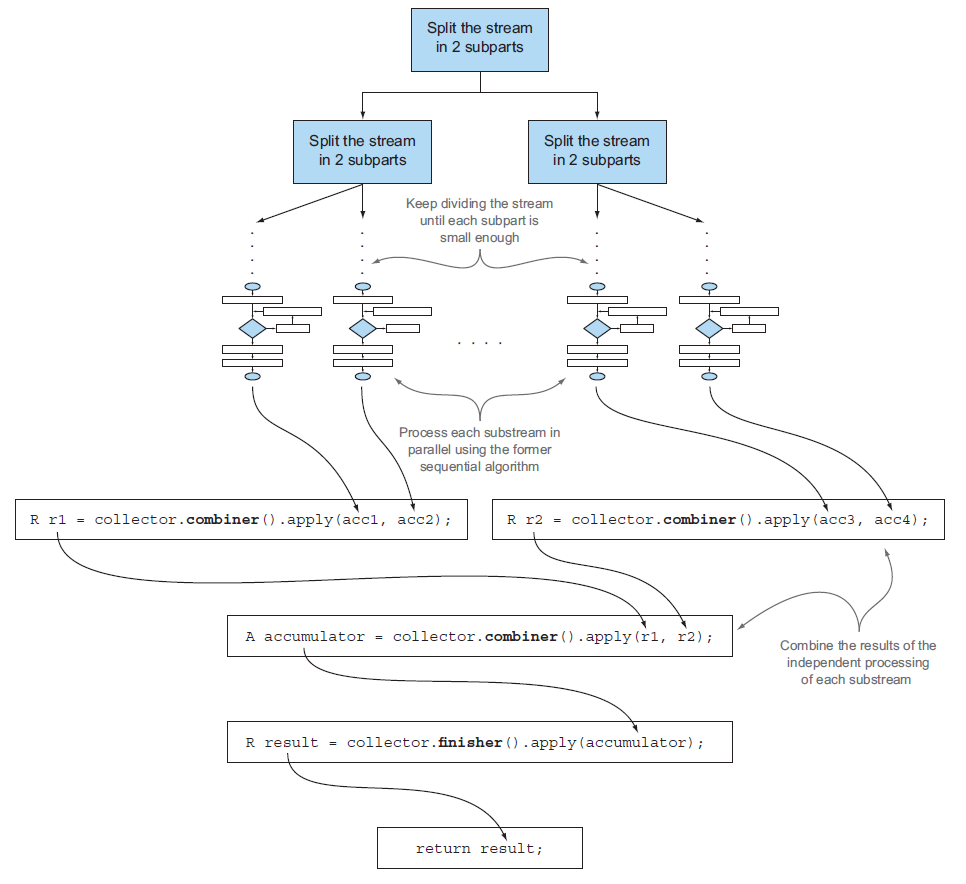
This defines how the accumulators resulting from the reduction of different subparts of the stream (processed in parallel) are combined.
For ToListCollector<T>, we just add the list to the other end of the list.
Parallelized reduction process using combiner method (Modern Java in Action)
The CharacteristicsMethod
This returns an immutable set of Characteristics, which defines the behavior of the collector
Characteristicsis an enumeration containing 3 items
UNORDERED - the result of the reduction isn't affected by the order in which the elements of the stream are traversed.
CONCURRENT - the accumulator function can be called concurrently and ran in parallel.
IDENTITY_FINISH - the function returned by the finisher method is the identity function.
The ToListCollector<T> is IDENTITY_FINISH and CONCURRENT. However, it is not UNORDERED because the order of the stream will be preserved in the resulting list.
Below is an example of using a Collector to make a Map whose keys are currencies and whose values are lists of transactions with corresponding currencies
Like the groupingBymethod, Collectors provide many pre-defined advanced reduction methods.
Methods that reduce and summarize the elements from the stream into a single value
Grouping elements from the stream
Partitioning elements from the stream
Reducing and Summarizing
Finding Maximum and Minimum Values
Collectors.maxBy and Collectors.minBy methods take a Comparator as argument to compare the elements in the stream
This is one of the advantages of using stream and Collectors. Collectors.maxBy(Comparator) is easy to understand - we are getting the maximum value from the stream by the comparator we put in.
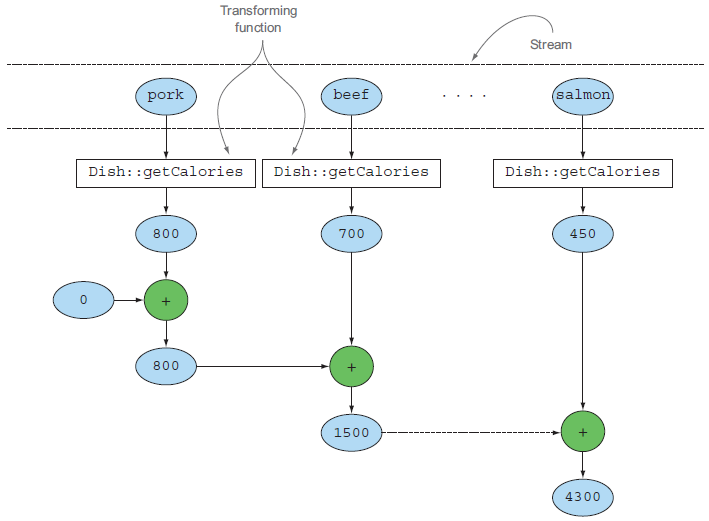
Collectors.summingInt and Collectors.averagingInt accept a function that maps an object into int, and return a Collector which will perform the requested operation when passed into collectmethod.
int totalCals = menu.stream()
	.collect(summingInt(Dish::getCalories));
summingInt collector (Modern Java in Action)
We can also use Collectors.summarizingInt which will return IntSummaryStatistics containing all the statistics about the given integers.
Collectors.reducing method is a generalized version of reducing.
First argument: initial value of the reduction process
Second argument: Method to transform element into target data type
Third argument: BinaryOperator that aggregates 2 items into a single value of the same type
One argument version is a special type where the first argument (initial value) is the first item of the string and the second argument is an identity function.
// Three arguments version
int totalAge = people.stream().collect(reducing(
	0, Person::getAge, (a1, a2) -> a1 + a2));

// One argument version
Optional<Person> oldestPerson = people.stream()
	.collect(reducing(
    	(p1, p2) -> p1.getAge() > p2.getAge() ? p1: p2));
Grouping
We can easily group elements of a stream into a set or a list based on one or more properties.
We pass a classification function to groupingBymethod
We can move the filtering predicate inside the collectmethod as a second predicate - in this case, keys that do not have any element will still appear in the resulting map.
Many times we will have Optionalin the resulting map depending on which filtering or mapping method we use.
To remove this Optional, or more generally to adapt the result returned by a collector into a different type, we can use Collectors.collectingAndThen method.
Collectors.collectingAndThen has 2 arguments - the first is the collector and the second is a transformation function.
Nested collectors (Modern Java in Action)
We have the outermost groupingBycollector denoted as a blue dashed box.
The groupingBycollector wraps the three collectingAndThencollectors, so that the result of those can be collected again with the groupingBycollector.
collectingAndThencollector wraps the maxBycollector, and the result of the maxBycollector is transformed by Optional::get method.
Partitioning
Partitioning is a special case of grouping where a predicate is used as a classification function
Since predicates return a Boolean, the resulting grouping Map will have at most 2 keys, which are Boolean.
Map<Boolean, List<Dish>> partitionedMenu = menu.stream()
	.collect(partitioningBy(Dish::isVegetarian));
    // isVegeterian is a partitioning function (predicate)
Advantages of Partitioning
It is easier and more intuitive to use partitioning when you want to separate a stream into two lists.
List<Dish> vegetarianDishes = menu.stream()
	.collect(partitioningBy(Dish::isVegeterian))
   	.get(true);
    // since the resulting grouping of collect is a map with true and false being keys
We can also apply multi-level mapping by using an overloaded version of partitioningBymethod.
Map<Boolean, Map<Dish.Type, List<Dish>>> vegetarianDishesByType = menu.stream()
	.collect(partitioningBy(Dish::isVegetarian, groupingBy(Dish::getType)));

    // result will be something like
    // {true = {OTHER=[Salad, Fruit]}, false = {FISH=[salmon], MEAT=[pork]}}
Main Static Factory methods of the CollectorsClass
Stream interface supports a filter method which takes a predicate (a function returning boolean) as argument.
filter method will return a stream including all elements that match the predicate
List<Dish> vegMenu = menu.stream()
        .filter(Dish::isVeg)	// Dish::isVeg is a predicate which returns true for dishes that are veg
        .collect(toList());
Stream interface also supports a distinct method which returns a stream with unique elements (this will depend on the implementation of hashcode and equals methods of the objects of the stream)
filter method above will need to iterate through the whole stream.
If the stream is already sorted, we can just stop iterating once the predicate condition is satisfied
takeWhile method will slice any stream using predicate by stopping iteration once an element not satisfying the predicate is found.
List<Dish> slicedMenu = specialMenu.stream()
	.takeWhile(dish -> dish.getCalories() < 320)
    	// will stop iterating if dish with calories above 320 is found
    	.collect(toList());
dropWhile method is the complement of takeWhile - it drops any element satisfying the predicate, and will return all the remaining elements once the predicate is not satisfied.
List<Dish> slicedMenu = specialMenu.stream()
	.dropWhile(dish -> dish.getCalories() < 320)
    	// will drop dishes that has calories lower than 320,
    	// and return the remaining elements if calories is greater or equal than 320
    	.collect(toList());
limit(n) will select only the first n elements from the stream and return those immediately.
skip(n) will return a stream skipping the first n elements
Mapping
Stream API's mapmethod takes a function as argument.
The function is applied to each element, which will map each element into a new element.
Depending on the function, it will change the data type of the elements in the stream.
List<Integer> dishNameLengths = menu.stream()	// a stream of Dish
	.map(Dish::getName)			// now a stream of String
    	.map(String::length)			// now a stream of Integer
    	.collect(toList());
We can flatten a stream using flatMap method.
In below, all the separate streams are flattened into a single stream.
List<String> uniqueCharacters = words.stream()
    .map(word -> word.split(""))	// each word is converted into an array
    	.flatMap(Arrays::stream)	// flattens each stream of array into a single stream of characters
        .distinct()
        .collect(toList());
Modern Java in Action
Finding and Matching
Another common use case of data processing with streams is finding elements that match a certain condition.
anyMatch method will return true if at least one element in the stream satisfies the given predicate - therefore anyMatch is a terminal operation.
if(students.stream().anyMatch(Student::isMale)) {
	System.out.println("We have a male student");
}
allMatch method will return true if all elements in the stream satisfy the given predicate
Unlike above findAny method, findFirst method will return the first element from the stream
List<Integer> numbers = Arrays.asList(1, 2, 3, 4, 5);
Optional<Integer> firstSquareDivisibleByThree = numbers.stream()
	.map(n -> n*n)			// square each number
    	.filter(n -> n%3 == 0)		// leave only those that are divisible by 3
    	.findFirst();			// 9
Reducing
Used to reduce the stream into Optional<T>
3 Main components: Identity, Accumulator, Combiner
Identity: the initial value of the reduction operation
Accumulator: a function that takes 2 arguments - the result is the partial result of the reduction, and will be the next element in the stream
Combiner: a function used to combine the 2 partial results - not necessarily needed if sequential streams are used (not parallel) and the types of the accumulator arguments and the types of its implementation match
Here the initial value is 0, and the accumulator is (a,b) -> a+b
int sum = numbers.stream().reduce(0, (a, b) -> a + b);
If we do not have an initial value, the reduction operation cannot return a sum with an empty stream, so Optional<Integer> will be returned
Optional<Integer> sum = numbers.stream().reduce((a, b) -> a + b);
Below reduction operation will reduce a list (stream) of strings into a single string
For parallel streams, we need a function (combiner) to combine the partial results of the substreams into a single one
int sum = numbers.parallelStream()
	.reduce(0, (a, b) -> a + b, Integer::sum);	// Integer::sum is the combiner
We also need a combiner when the types of stream objects and accumulator parameters mismatch.
int result = users.stream()
	.reduce(0, (partialAge, user) -> partialAge + user.getAge(), Integer::sum);
    // partialAge is int, while user is User
    // Integer::sum is used as combiner to resolve this mismatch
Streams are an update to the Java API starting from Java 8.
A stream is a sequence of objects that supports various methods which can be pipelined to produce the desired result in a declarative way
Short definition: a sequence of elements from a source that supports data-processing operations
Sequence of elements: just like a collection which is a sequence of data structures (mostly for storing and accessing elements), a stream is a sequence of computations (like filter, sorted, map)
Source: stream consumes a data-providing source like a collection
Data-processing operations: stream provides data-processing operations like filter, sorted, map which can be ran either sequentially or in parallel
+ Pipelining: many stream operations return stream itself, which allows the operations to be pipelined
+ Internal iteration: the iterations are done behind the scenes unlike collections
Instead of doing below before (Java 7)
List<Dish> lowCaloricDishes = new ArrayList<>();
for (Dish dish: menu) {
	if (dish.getCalories() < 400) {
    	lowCaloricDishes.add(dish);
    }
}
The code is written in a declarative way - Instead of specifying how to implement what we want using control blocks (for, if, ...), we specify what we want to implement (filter with low calories)
We can easily implement and execute the stream code in parallel with parallelStream
Streams vs. Collections
Streams can only be traversed once (Note that in pipeline, each stream operation returns another stream)
List<String> title = Arrays.asList("Modern", "Java", "In", "Action");
Stream<String> s = title.stream();
s.forEach(System.out:: println);
s.forEach(System.out:: println);	// java.lang.IllegalStateException!
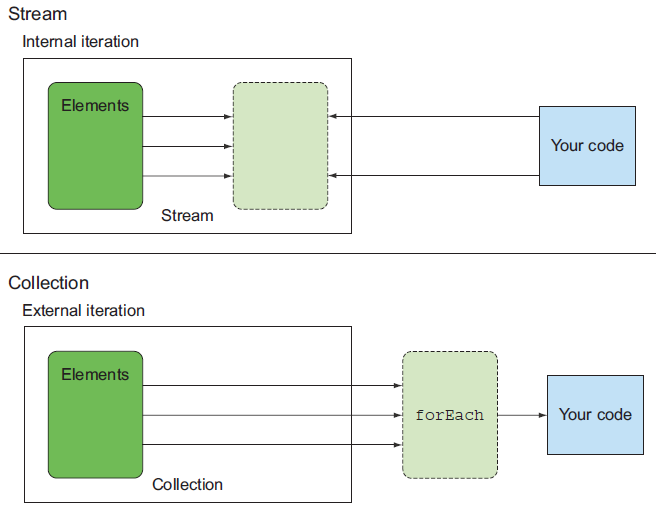
Stream has internal iteration while Collection has external iteration
In a collection, you use control blocks (for-each loop, etc) or Iterators
(Modern Java In Action)
Stream Operations
Stream can be summarized into 3 steps: Data Source > Intermediate Operations > Terminal Operation
Intermediate Operations
Operations like filter, map, and limit, which are connected together to form a pipeline
These operations return another stream as the return type, so that the operations can be connected to form a query
Terminal Operations
Operations like count and collect, which produce a result (Integer, List, void, etc) from a stream pipeline